Feature highlight

Training management made simple

Schedule training sessions, manage automatic waiting lists, send group-targeted push notifications, and track attendance — all in one place designed specifically for table tennis clubs.
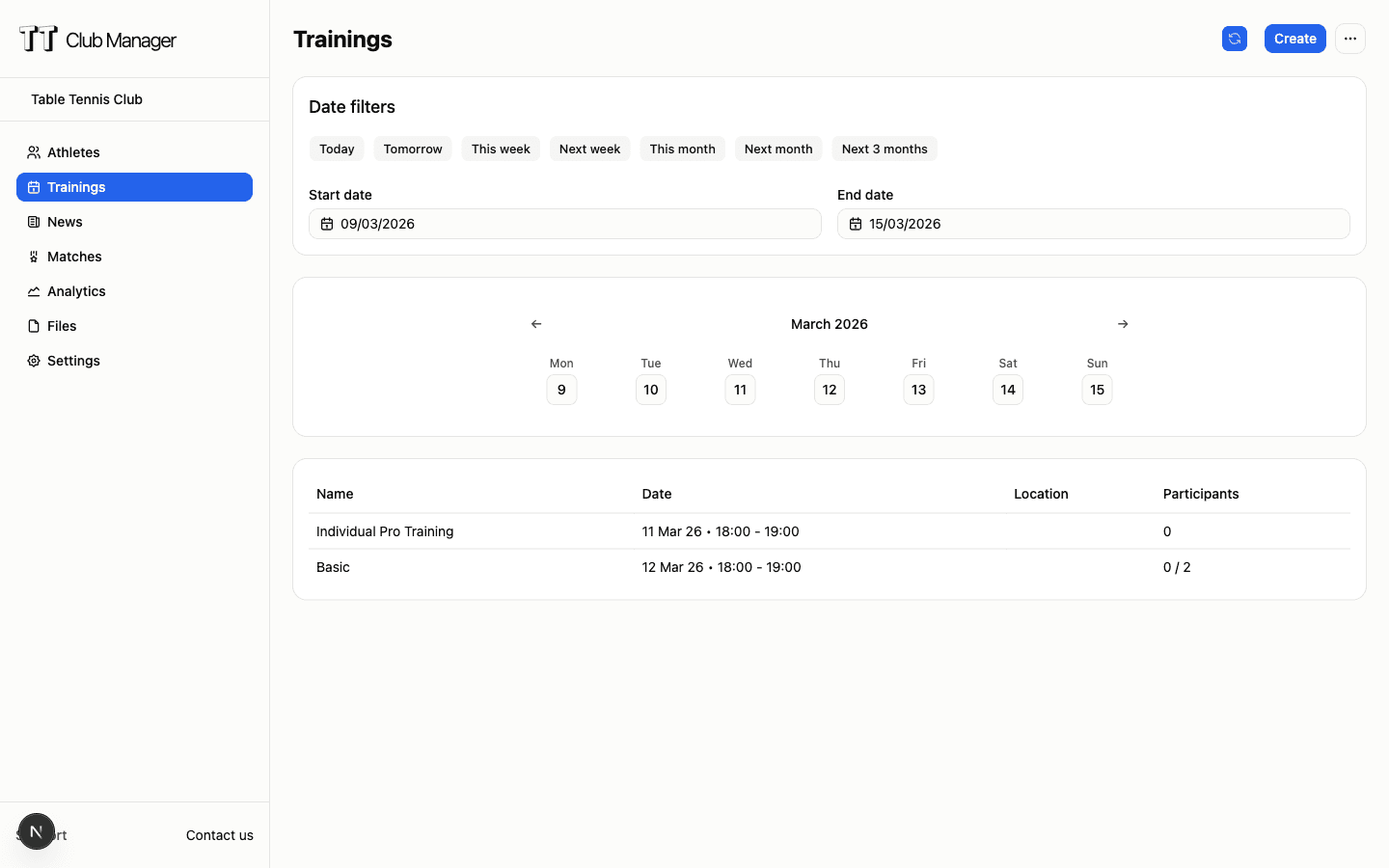
TT Club Manager training management interface

Flexible scheduling

Create one-time or recurring periodic trainings with custom frequencies. Set start and end dates for seasonal programs.

Capacity management & waiting list

Set minimum and maximum capacity limits for each training. When a training is full, members join the waiting list and automatically receive a push notification when a spot frees up, with confirmation within a time window.

Real-time tracking

Track attendance in real-time. See who registered, manage no-shows, and monitor participation trends.

Group-based trainings

Reserve trainings for specific groups like league, practice, or guests. Only members of allowed groups can book and receive push notifications for the training.

How training management works

Streamline your training operations in three simple steps

1

Create your training

Set up training sessions with details like date, time, location, and capacity limits. Choose between one-time events or set up periodic trainings that repeat weekly or daily. Assign the training to specific groups to restrict bookings and target notifications.

2

Members register

Members receive push notifications when registration opens, sent only to allowed groups, and can sign up through the mobile app or web interface. The system automatically enforces capacity limits: when a training is full, members join the waiting list and receive a push notification when a spot frees up, with confirmation within a time window.

3

Track and analyze

Monitor attendance in real-time, export training data for analysis, and track participation trends to optimize your club's training programs.

Who benefits from training management

Designed for everyone involved in your club's training programs

For club coaches

Plan your weekly training schedule, assign players to specific tables, and track who attended each session. Monitor attendance patterns to optimize your programs.

For club administrators

Manage multiple training groups simultaneously. Set different capacity limits for beginner, intermediate, and advanced sessions.

For members

Easily register for trainings through the mobile app or web. Receive push notifications when registration opens and view your training schedule at a glance.

For parents

Register sub accounts for trainings, receive notifications about schedule changes, and track attendance history through the member portal.

Training management comparison

See how TT Club Manager compares to manual methods

FeatureManual/Other toolsTT Club Manager
Registration managementManual sign-up sheets or spreadsheets
Online registration with automatic capacity limits
Recurring schedulesRecreate schedules every season
Periodic trainings that auto-generate sessions
Waiting list and freed spotsWhatsApp or manual sign-in sheets to manage replacements
Automatic waiting list with push notification and time-windowed confirmation
Group-targeted notificationsGroup messages sent to everyone
Push notifications only to allowed groups for the training
Group-restricted trainingsSeparate sheets or manual lists
Restrict bookings to specific groups (league, practice, guests)
NotificationsEmail chains or WhatsApp groups
Automated push notifications to members
Attendance trackingPaper sign-in sheets
Digital attendance with exportable reports

Common questions

Can I set up recurring trainings?

Yes. You can create periodic trainings that repeat daily or weekly with custom start and end dates. Perfect for seasonal programs or regular weekly sessions.

How do members register for trainings?

Members can register through the mobile app or web interface. They receive push notifications when registration opens, sent only to allowed groups, and can view all available trainings in their member portal.

What happens when a training is full?

Members can join the waiting list. When a spot frees up, the system automatically notifies the first member in line, who can accept or decline within a time window. If the offer expires, it automatically passes to the next member in line.

Can I reserve a training for specific groups?

Yes, you can assign each training to specific groups (e.g. league, practice, guests). Only members of those groups can book and receive push notifications for the training.

Can I export training attendance data?

Yes. You can export training attendance data to CSV format for analysis. Track who attended which sessions, analyze participation trends, and generate reports.

Ready to streamline your trainings?

Start your 7-day free trial today. No credit card required.

TT Club Manager

Your complete table tennis club management solution

© 2026 TT Club Manager. All rights reserved.